

This guide is in English for now. The tool itself works in your language.
How to make a GST tax invoice
The invoice maker works out CGST + SGST or IGST from the two states, adds a tax summary by HSN, the amount in words and a UPI QR code. This article walks through one invoice from start to finish.
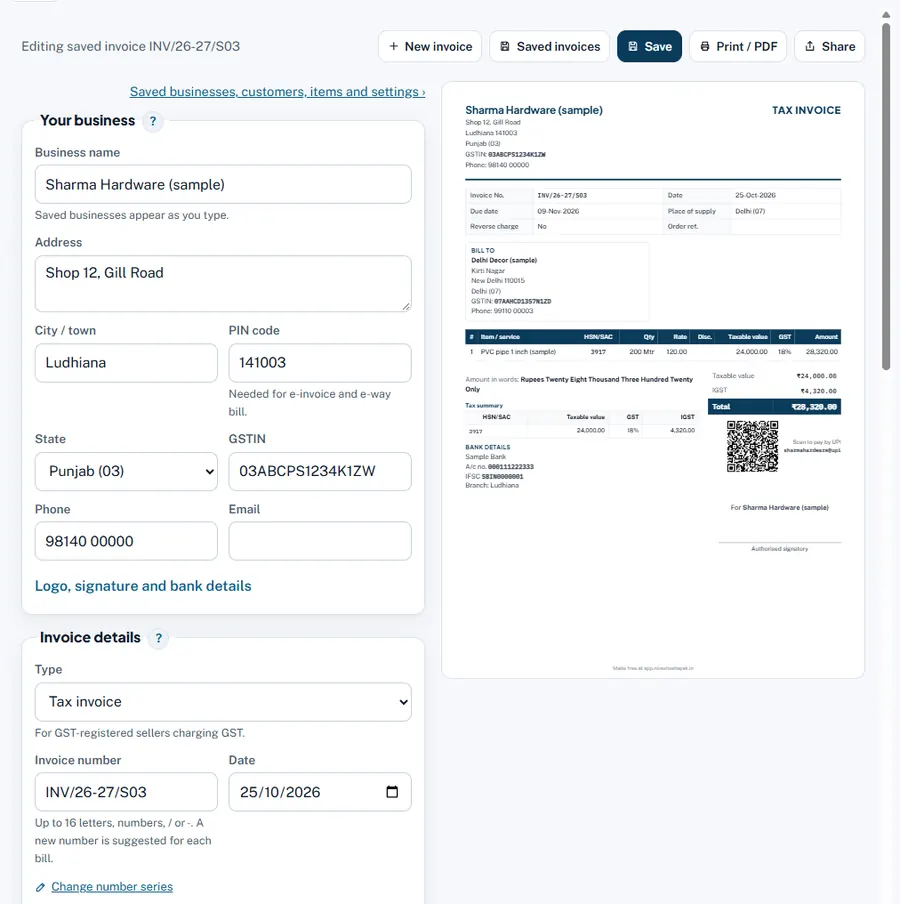
Step by step
- Your business. Type your Business name, address, City / town, PIN code, State and GSTIN the first time; after that pick your saved business (or it is filled in as the default). Logo, signature and bank details are under Logo, signature and bank details.
- Invoice details. Type: Tax invoice (GST-registered and charging GST), Bill of supply (exempt goods or composition) or Invoice (not GST registered). Check Invoice number and Date; add a Due date if you give credit.
- Bill to. Start typing the Customer name and pick a saved customer, or type the name, address, GSTIN (if registered) and state. Tick Ship to a different address when goods go elsewhere.
- Place of supply. Usually the buyer's state. It decides CGST + SGST (same state as you) or IGST (another state).
- Items. For each line: Description (pick a saved item to fill it), HSN/SAC, Qty, Unit, Rate (₹) before GST, Disc. % and GST %. Press Add item for more lines, Add a charge (freight, packing…) for extra charges.
- Check the preview. On a computer it is beside the form; on a phone press Preview.
- Save, then Print / PDF or Share. The invoice is saved in your data home and shows in the App's Sales and Dues.
Worked example
Sharma Hardware (Punjab) bills Delhi Decor (Delhi, GSTIN 07AAHCD1357N1ZD): 200 Mtr PVC pipe at ₹120, GST 18%.
| Taxable value 200 × ₹120 | ₹24,000 |
| IGST 18% (Delhi is another state) | ₹4,320 |
| Total | ₹28,320 |
Had the buyer been in Punjab, the tax would be CGST 9% ₹2,160 + SGST 9% ₹2,160. The amount in words reads "Rupees Twenty Eight Thousand Three Hundred Twenty Only".
Rules and dates
A tax invoice must show the details in Rule 46 of the CGST Rules (supplier and recipient GSTIN, serial number, date, HSN, taxable value, rate and amount of tax, place of supply, signature). For a sale to an unregistered buyer of ₹50,000 or more, the buyer's name, address and state must be printed. The 28% GST rate is not used for new supplies from 1 February 2026; the maker's rate list follows the bill date.
Common mistakes and how to fix them
- Wrong tax type (IGST instead of CGST + SGST). Check Place of supply and the customer's state.
- Rate typed with GST included. Rate is before GST; the maker adds GST.
- Changing an old invoice after the customer has it. Issue a credit note or debit note for the difference instead.